For independent and small-team adult-video creators

One workflow for size calculation, moving targets, and editor handoff.

Calculate the size. Track the target. Hand the matte to your editor.

Click a target. Track frames. Export an H.264 matte.

= size calculation / frame tracking / human final check

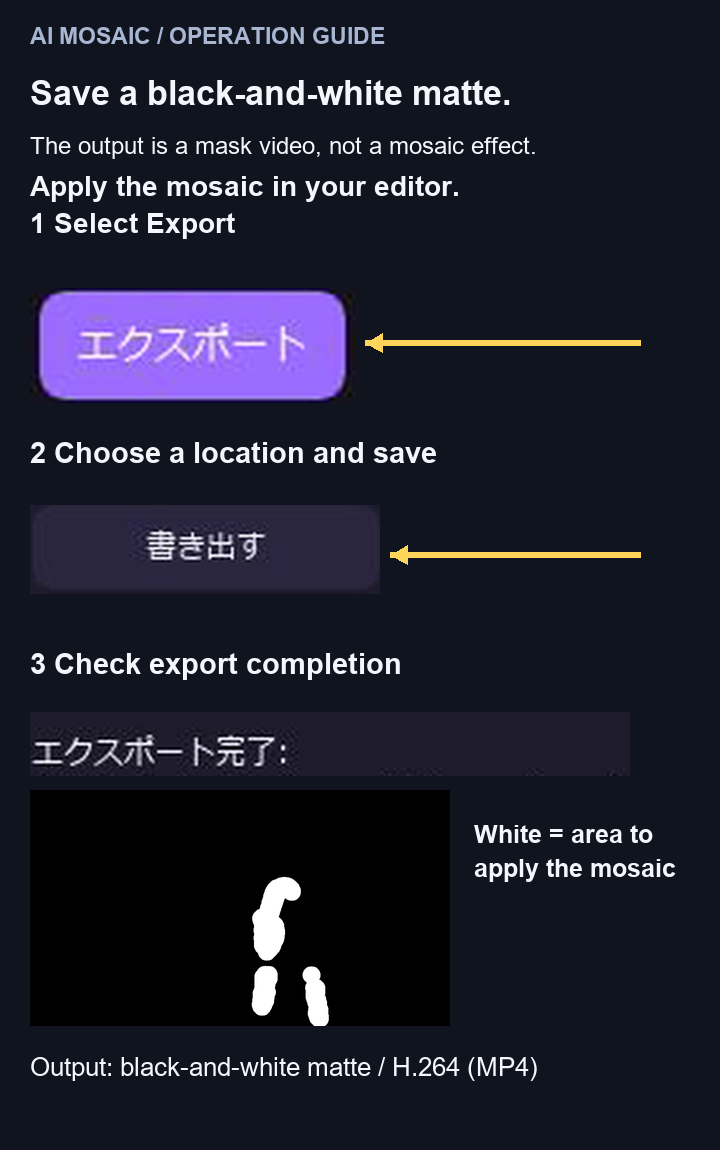
Click a target in the video, track it across frames, and calculate a mosaic size with the FANZA-oriented safety preset. Export a reusable black-and-white H.264 matte and perform the final check in your editor.

One-time purchase · Windows · Offline after initial activation

Inference runs on your local CPU/GPU. Frames are never sent to external APIs.

These Challenges Sound Familiar?

01

Recalculating size for every source

Every resolution change adds another long-edge check, size calculation, and manual setting.

02

Repairing and reviewing moving masks

Movement and occlusion require tracking the target and scrubbing the timeline to verify the result.

03

The fear of sending originals to the cloud

Unedited footage passing through external servers is a risk in itself. Keeping processing on your own machine is the strongest countermeasure.

One workflow for calculation, tracking, and handoff

01

Calculate with a safety-side preset

Calculates max(20px, long side // 100). The actual UI shows 20 px for 1920×1080 and 38 px for 3840×2160.

02

Click selection and frame tracking

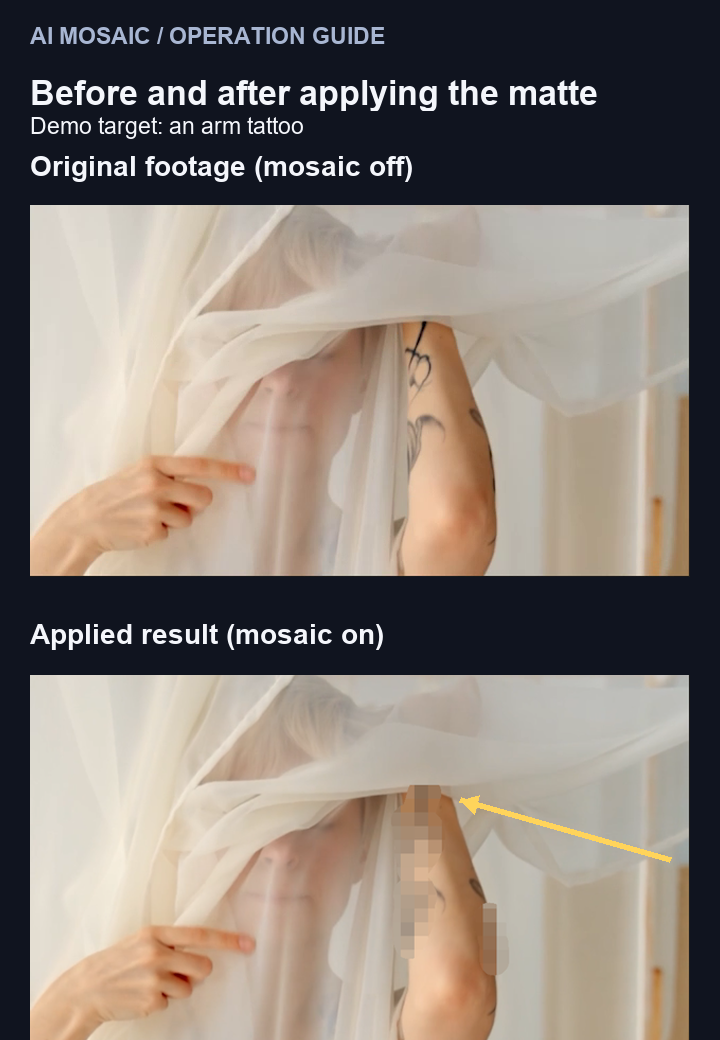
Click the target and track it across frames. The public demo verifies the full fine-detail tattoo through two partial occlusions over 85 frames.

03

H.264 matte and local processing

Export a black-and-white H.264 matte for your editor. Inference stays on your machine, and the editor performs the final timeline check.

FANZA-oriented safety preset

Size-calculation assist

The product calculates max(20px, long side // 100): 20 px for 1920×1080 and 38 px for 3840×2160. It does not guarantee review, legal compliance, or distribution approval; the editor performs the final check.

Product calculation

max(20px, long side // 100)

1920 → 20px · 3840 → 38px

How It Works

  1. 01

    Import a video and click the target

    Open a video and mark the region to be mosaicked on screen.

  2. 02

    Calculate size and track frames

    Use the safety-side preset for size and track the selected target across frames.

  3. 03

    Hand the H.264 matte to your editor

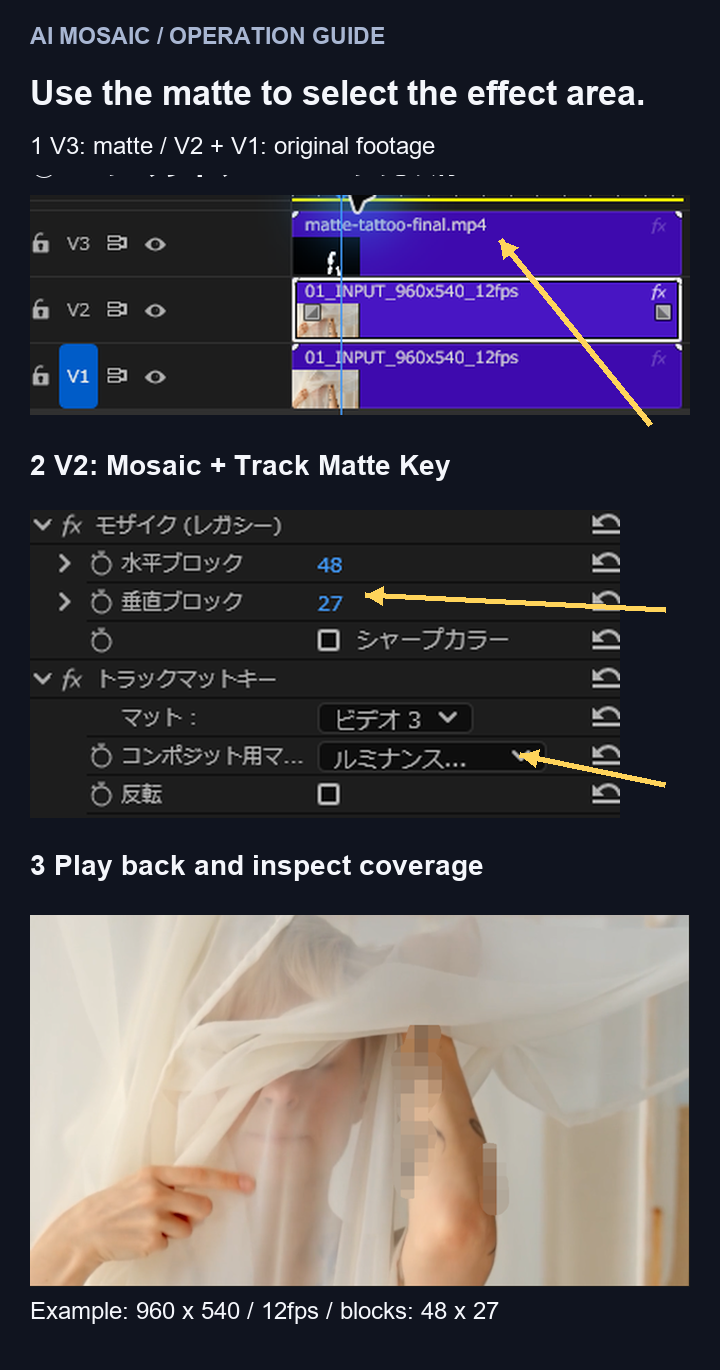
    Export the black-and-white matte, import it into an NLE, and scrub the applied result for a human final check.

See the actual UI confirm 1920×1080→20 px and 3840×2160→38 px, then follow target selection, 85-frame tracking, H.264 matte export, Premiere Pro import, and a human timeline scrub.

Simple, One-Time Pricing

Checking resolutions, computing sizes, setting regions by hand — a one-time-purchase assist tool built to shorten the steps you repeat on every single release.

Early bird

¥9,800

One-time price during the initial offer period.

Default

¥19,800

Standard one-time price.

Get AI Mosaic Tool — from ¥9,800

One-time purchase · Checkout via Lemon Squeezy

What's Included

  • Windows app
  • Safety-side mosaic size calculation
  • Click selection and frame tracking
  • Black-and-white H.264 matte export
  • Offline operation after initial activation

Frequently Asked Questions